 IDBE RibbonCreator 2010
 Finish Access
IDBE RibbonCreator 2010
Finish Access
Finish Access
IDBE RibbonCreator 2010
Finish Access
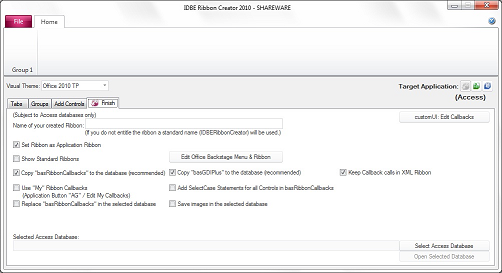
On this page you can define additional settings for the ribbon.
If you have loaded a ribbon from an Access database or if you want to transfer or update a ribbon to an Access database you should consider following points:
Ribbon from an Access Database:
If "Replace Ribbon" remains checked the ribbon in the database will be updated.
The Button "Open selected Database" open the selected Access Database.
customUI: Edit Callbacks: Define other callbacks for the CustomUI control.
The Button labeled "Edit Office Backstage Menu & Ribbon" opens the Office Backstage Menu & Ribbon Editor.
The options
will have an effect only if you decide to export the ribbon to the database.
Once you decided to uncheck the option
all Callback calls in the Ribbon XML Definition will be deleted.
If you select the option
the module "basRibbonCallbacks" will be replaced with the new version.
If the option
is checked, the customized basRibbonCallbacks file will be used.
If the option
is checked, the Select-Case statements for all ribbon controls will be added to the modul "basRibbonCallbacks".
Checking the option
will hide Standard Ribbons on the Office Application.
Checking the option
the current ribbon will be set to be the Application Ribbon.
If you have checked
your customized images will be stored in the table "tblBinary".
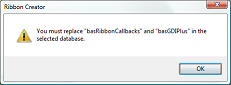
A hint will appear stating that the modules "basRibbonCallbacks" and "basGDIPlus" need to be replaced.
A click on this button creates a text file containing the full content of the module "basRibbonsCallbacks" as well as all required select-case-statements.
To get all necessary Select-Case-Statements replace the content of the existing module "basRibbonsCallbacks" in Excel or Word with the entire content of these text file.
A click on this button creates a text file containing the RibbonXML Code from your Ribbon.
The option to select an Access Database is available only if Access 2010 is installed on the computer.
You can always save the created ribbon as XML file.